- Does HeroScribe run on my OS?
- When I try to open HeroScribe, the Nokia PC Suite opens!
- HeroScribe won't run!
- HeroScribe.bat won't run either!
- How do I run HeroScribe under Ubuntu?
- HeroScribe cannot open any XML file!
- When will you release next version of HeroScribe?
- Where can I find the original HeroQuest maps for HeroScribe?
- Is there the x icon?
- Can I customize the existing icons?
- Can I add new icons to HeroScribe?
- How do I convert raster to vector?
- My icon is off-center, how do I true it up?
- Can I add new boards to HeroScribe?
- Can I add new rooms and passages to the board?
- Can I use the "german", double corridors version of the board?
- Can I add text to quests?
- How can I print quests?
- How do I edit high quality, .eps quests?
- How can I manually edit XML files, and... should I?
- I downloaded an Icon Pack from HeroScribe.Org, how do I install it?
- I want to use two Icon Packs together, how do I do that?
- I downloaded the All-In-One/Just Boards Icon Packs, but how do I switch board?
- I want to easily choose between two boards, how do I do that?
- My question is not answered here!
When I try to open HeroScribe, the Nokia PC Suite opens!
When Nokia PC Suite is installed on Windows, it gains control on the .jar extension (the one used by java applications); that Nokia utility will open any .jar file, making it impossible for HeroScribe to run.To solve the issue select Folder Options, search for .jar under File Types tab, then click Change and choose Java(TM) 2 Platform Standard Edition binary.
The Nokia utility, now, will not run any .jar files and HeroScribe will start up as wanted. HeroScribe requires the Java Runtime Environment: please download it and install it in order to start HeroScribe.
If you are trying to run an Icon Pack and HeroScribe is showing the splash image without moving on, the reason why it is not starting up may be due to the size of RAM Java is allowed to run on your machine. To solve the issue under Windows you may try the following: create a file named HeroScribe.bat in the HeroScribe folder, then edit it with any text editor (we suggest NotePad++, or TextEdit) by inserting this line:
start javaw -Xms1024M -Xmx1024M -jar HeroScribe.jarPlease note that values for -Xms and -Xmx are based on the RAM you are running on your system and are expressed in MB. Once the edits are done just run HeroScribe by double clicking HeroScribe.bat; such file is already included in the All-In-One, the biggest Icon Pack out there hence the one which is possibly causing your HeroScribe not to run.
HeroScribe.bat won't run either!
When launching HeroScribe by double clicking the .bat file included, for instance, inside the All-in-One Icon Pack, you may be told what follows:Windows cannot find javawMeaning that you don't have the environment variable set to your Java bin folder; in order to configure it under Windows, right click on (My) Computer -> Properties -> Advanced (system settings) -> Enviroment Variables -> System variables, then:
- if there is no PATH variable, click on New and type PATH for Variable name and C:\Program Files/Java/jre7/bin for Variable value
- if there is a PATH variable, click on it, select Edit and add ;C:\Program Files/Java/jre7/bin at the end of Variable value
C:\Program Files/Java/jre7/binMight change according to the Java Runtime Environment version installed on your system.
How do I run HeroScribe under Ubuntu?
Say you have extracted HeroScribe inside ./Desktop/HeroScribe; run a terminal and type:cd ./Desktop/HeroScribeThen run:
java -jar HeroScribe.jarIf you would like a launcher to HeroScribe, run a terminal and type:
sudo nano ./Desktop/HeroScribe/HeroScribeLauncherOnce nano runs, type the following in two different lines:
cd ./Desktop/HeroScribeSave current file then close nano. Now create the launcher and give it this command:
java -jar HeroScribe.jar
./Desktop/HeroScribe/HeroScribeLauncherThat will do it.
HeroScribe cannot open any XML file!
We are aware of this issue; it started with the release of Java Runtime Environment 1.6, which throws an exception when trying to parse an XML file whose path contains a space. Developers at Sun fixed this bug, please download the latest Java Platform to solve the issue.If the issue persists, you might be trying to open a quest featuring icons your current HeroScribe is not including. Try downloading and installing the All-In-One Icon Pack from the Icon Packs Section, then reopen the .xml quest: a popup will tell you what icon is missing in HeroScribe. With the Icon Packs being more than 50, when releasing .xml quests authors should declare the Icon Pack used, if there was any.
When will you release next version of HeroScribe?
Unfortunately, we do not know. We could not find time to work on it in the past years, and cannot provide a release date for now.Where can I find the original HeroQuest maps for HeroScribe?
You may find the original HeroQuest maps in the XMLs Section. Please be aware these files are not intended as a challenge to the rights of the Milton Bradley Company/Hasbro, Inc. in regard to HeroQuest. Please refer to Objects.html (available in the HeroScribe install folder or by clicking Help -> Objects... in HeroScribe) for any icon information.Can I customize the existing icons?
As said before, HeroScribe uses vector graphics to achieve an ad-libitum scalable output quality.You may modify an EPS found in HeroScribe but you might need our help to convert it to an Icon Pack. We will be glad to help you out, just read carefully the instructions available on the Icon Packs Section.
If instead you would like to convert it yourself, please read the FAQ at Can I add new icons to HeroScribe?
Can I add new icons to HeroScribe?
Yes you can! On the Icon Packs Section you will find many new monsters, rooms, furniture and traps to add to your Quests. Shall you want your own icons included in an Icon Pack at HeroScribe.Org, please carefully read the instructions available on the Icon Packs Section.Please note that adding raster images to HeroScribe would be highly unproductive: we spent time converting original HeroQuest icons from raster to vector graphics, and as a result the final product is closest as possible to the original one; that is why importing raster images would not allow the ultimate product's top quality, and why we will only accept vector icons for your Icon Pack.
If instead you would like to personally work on your icons, without including them in an Icon Pack available here, you will need to follow an in-depth guide to convert your .eps icons to HeroScribe; it is not an easy process, but since you keep reading this you would probably like to know how to do it, so here it goes. First, you will need to install the following software:
- latest ImageMagick release (which will help you handling raster images of your icons - when asked to be sure to check Install legacy utilities (e.g. convert) too)
- Python 2.7.13 (which will help you compiling your Objects.html)
Once downloaded, extract it somewhere on your disk and run the setup.exe you got from the cygwin home page; click on Install from Local Directory, then choose the root directory for cygwin (we strongly recommend using the default C:\cygwin) and the cygwin setup folder you extracted a while ago. Once you have the window displaying the modules available for setup, be sure to install all the following (you will not be able to convert your icons if you do not select these modules):
- bc (from Math)
- ghostscript 8.15-2 (from Graphics)
- python (from Python)
- libxml2 (from Gnome)
- libxslt (from Gnome)
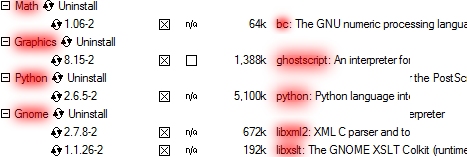
When asked to, please confirm to also install the required packaged (RECOMMENDED option) associated to the ones you previously selected (older versions of cygwin call these the required modules). Once the setup is finished, remember to copy the cygpng12.dll file available in cygwinnewsetup.zip and paste it into C:\cygwin/bin. Please note: you might need to add the cygwin binaries to your path. To do so, right click on Computer, click Properties, then Advanced system settings and Environment Variables...; create a new environment variable with name CYGWIN_HOME and value C:\cygwin (or wherever you installed cygwin). Then edit the environment variable named PATH and add the following to the end:
;%CYGWIN_HOME%\bin;%CYGWIN_HOME%\sbin;%CYGWIN_HOME%\usr\bin;%CYGWIN_HOME%\usr\sbin;%CYGWIN_HOME%\usr\local\bin;%CYGWIN_HOME%\usr\local\sbin
Are we done yet? Nope, we are at the starting gun.
If you start up cygwin, you will be asked to create your personal user folder in C:\cygwin/home: do it, then extract this file in your personal folder (C:\cygwin/home/Dewayne, let's say - please note that older version of cygwin might need the old HeroScribe scripts available here). In this file you will find:
- Icons folder: where your .eps icons will be stored (put them in the right folder: Icons/Vector/Europe for the european version, Icons/Vector/USA for the north-american)
- 0_heroscribe.sh: the script you will run to vectorize, rasterize and make a sample of your icons
- 1_vector.sh: the script that will vectorize your icons
- 2_raster.sh: the script that will rasterize your icons
- 3_sample.sh: the script that will make a sample of your icons (needed for Objects.html)
- 4_html.py: the script that will compile your Objects.html
- 4_htmlallinone.py: the script that will compile your Objects.html - All-In-One Icon Pack version
- 5_check.sh: the script that will check whether and why HeroScribe is starting up or not
- 5_checkallinone.sh: the script that will check whether and why HeroScribe is starting up or not - All-In-One Icon Pack version
- Cygwin: a fast shortcut to the cygwin terminal
- 0_heroscribe.sh redirects to your current cygwin folder: change the 3 /home/Administrator/ occurrences to whatever your user cygwin folder is (e.g. if your personal folder in C:\cygwin/home is Dewayne, change every occurrence to /home/Dewayne/ - /home/Dewayne/1_vector.sh $FILE, sh /home/Dewayne/2_raster.sh and so on)
- 3_sample.sh redirects to your current ImageMagick's convert.exe file: change the 3rd line to wherever your ImageMagick's convert.exe is located (e.g. ours is at C:\Program Files\ImageMagick-7.0.5-Q16/convert.exe)
- 4_html.py redirects to your current Python's python.exe file: change the 1st line to wherever Python's python.exe is located (e.g. ours is at C:\Python27/python.exe)
Are we done yet? Nope, we just made sure to start after the starting gun. Race has just started.
We will now try and convert our first icon, featuring a Blank Circle available at:
- C:\cygwin/home/Dewayne/Icons/Vector/Europe/Sample/Sample.BlankCircle_EU.eps as for the european version
- C:\cygwin/home/Dewayne/Icons/Vector/USA/Sample/Sample.BlankCircle_US.eps for the north-american one
How do we convert those icons? Start up the cygwin terminal by double clicking the Cygwin shortcut in the hypothetical C:\cygwin/home/Dewayne folder, then type sh 0_heroscribe.sh and hit Enter to start the script that will convert our icons (you may want to type sh 0 and hit TAB then Enter so that cygwin will automatically select the file we are looking for). What is happening now? cygwin is converting our icons: the process will end once the cursor gets back to the terminal. Now, copy the C:\cygwin/home/Dewayne/Icons folder and paste it in C:\cygwin/home/Dewayne/HeroScribe: new icons now require to be referenced in HeroScribe; in order to do that, open C:\cygwin/home/Dewayne/HeroScribe/Objects.xml (as always with NotePad++, or TextEdit) then add the following at the end of the file (but before the final </objectList> tag):
<object name="Blank Circle" id="BlankCircle" width="1" height="1" kind="various">Now, if you run HeroScribe from C:\cygwin/home/Dewayne/HeroScribe you will notice the Blank Circle icon under Add object -> Various. We made it! If you would like your new icon to be listed under any other category, have a look at the beginning of your Objects.xml (once again, open it with NotePad++, or TextEdit):
<icon region="Europe" path="Europe/Sample/Sample.BlankCircle_EU" original="false"/>
<icon region="USA" path="USA/Sample/Sample.BlankCircle_US" original="false"/>
</object>
<kind id="hero" name="Heroes" />These are the categories available by default; pick yours, then type its id inside the kind attribute of your icon's object tag:
<kind id="monster" name="Monsters" />
<kind id="man-at-arms" name="Men-at-Arms" />
<kind id="furniture" name="Furniture" />
<kind id="door" name="Doors" />
<kind id="mark" name="Marks" />
<kind id="trap" name="Traps" />
<kind id="room" name="Rooms" />
<kind id="various" name="Various" />
<object name="Blank Circle" id="BlankCircle" width="1" height="1" kind="man-at-arms">Your icon will now be listed under Add object -> Men-at-Arms.
<icon region="Europe" path="Europe/Sample/Sample.BlankCircle_EU" original="false"/>
<icon region="USA" path="USA/Sample/Sample.BlankCircle_US" original="false"/>
</object>
If you want to update your Objects.html so that it includes your new icons, start up the cygwin terminal by double clicking Cygwin then type python 4_html.py and hit Enter (or type python 4 then hit TAB and Enter); this will automatically edit C:\cygwin/home/Dewayne/HeroScribe/Objects.html - and that's it.
The last remaining script is 5_check.sh: what does it do? While working on your personal icon pack, you might handle over dozens of icons: that may lead to some errors in the editing of your Objects.xml file; if that occurs, HeroScribe will not run and you will not be able to know at once what is going on there (unless you have installed one of the latest Icon Packs - the All-In-One, to name one - in that case you will be told what is going wrong). That is what the checking scripts does: start up cygwin (double click on the shortcut), then hit sh 5, TAB and Enter; the terminal will tell you what you need to fix in order to run HeroScribe with your icons.
That's it, you won the 100-metre dash!
Now, wait a minute. You might want to convert some other icon than a Blank Circle. If that is your case, you will need to know the sizes used in HeroQuest. Here's a list of the ones we have used for the Icon Packs available at HeroScribe.Org (please note the unit of measure is the millimeter, mm - in Inkscape, the software we suggest to convert and manage your vector icons with, you can change the rulers' unit of measure by opening the Document Preferences with Ctrl+Shift+D and by changing the Default units):
| Icon | Size (mm) |
|---|---|
| 1x1 circle | 5.921 x 5.918 |
| 2x1 ellipse | 11.788 x 5.918 |
| 3x1 ellipse | 17.871 x 5.918 |
| 1-square width | 6.853 |
| 2-square width | 13.999 |
| 3-square width | 20.778 |
| 4-square width | 27.566 |
| 5-square width | 34.341 |
| 6-square width | 41.099 |
| 7-square width | 47.843 |
| 8-square width | 54.644 |
| 9-square width | 61.497 |
| 10-square width | 68.192 |
| 11-square width | 74.965 |
| 12-square width | 81.739 |
| 13-square width | 88.512 |
| 14-square width | 95.285 |
| 15-square width | 102.059 |
| 16-square width | 108.832 |
| 17-square width | 115.605 |
| 18-square width | 122.379 |
| 19-square width | 129.152 |
| 20-square width | 135.925 |
Ok, are we done yet? Nope, you still need to color your icons for the north-american layout of the map.
Here is the palette we have used for the over 1500 icons available for HeroScribe:
| Color | RGB |
|---|---|
 | white: 255 255 255 black: 0 0 0 |
 | maroon: 153 67 100 light maroon: 194 145 156 beige: 244 231 223 |
 | orange: 250 124 50 |
 | red: 201 22 58 |
 | light green: 193 232 211 |
 | green: 100 160 110 |
Once your icons are ready and have the exact size/color, export them as .eps and paste them inside C:\cygwin/home/Dewayne/Icons/Vector/:
- Europe/YourIconPackName/YourIconPackName.YourIcon_EU.eps for the european version
- USA/YourIconPackName/YourIconPackName.YourIcon_US.eps for the north-american one
Remember to change YourIconPackName according to your needs. Once your icons are ready inside C:\cygwin/home/Dewayne/Icons/, just run the sh 0_heroscribe.sh script inside the cygwin terminal, paste the results inside C:\cygwin/home/Dewayne/HeroScribe/Icons/ and make the relative changes in C:\cygwin/home/Dewayne/HeroScribe/Objects.xml; you will need to choose the category for your icons, and adjust their offsets if they don't perfectly fit in the center of the square/s they occupy. Your icons are now ready to be used!
How do I convert raster to vector?
The opensource way we suggest is Inkscape; please follow this simple tutorial to vectorize your icons.My icon is off-center, how do I true it up?
Say this is your icon reference inside Objects.xml:<object name="Flying Spaghetti Monster" id="FlyingSpaghettiMonster" width="2" height="1" kind="god">You will need to add some attributes, xoffset and/or yoffset, to the <Icon> tags:
<icon region="Europe" path="Europe/Gods/Gods.FlyingSpaghettiMonster_EU" original="false"/>
<icon region="USA" path="USA/Gods/Gods.FlyingSpaghettiMonster_US" original="false"/>
</object>
<object name="Flying Spaghetti Monster" id="FlyingSpaghettiMonster" width="2" height="1" kind="god">xoffset being the horizontal offset from the icon center and yoffset being the vertical offset from the icon center; if icon is 2x1 squares wide, its center will be at 1,0.5 - if icon is a single square wide, its center will be at 0.5,0.5. Offset units refer to the HeroQuest square: 1 being the entire square size, 0.5 being its half and so on.
<icon region="Europe" path="Europe/Gods/Gods.FlyingSpaghettiMonster_EU" xoffset="0.05" yoffset="-0.1" original="false"/>
<icon region="USA" path="USA/Gods/Gods.FlyingSpaghettiMonster_US" xoffset="0.05" yoffset="-0.1" original="false"/>
</object>
In the following case we are moving the Goblin by nothing (xoffset="0.0": 1x1 icon is centered in a square) and by 0.5 square (xoffset="0.5": icon is shifted half square to the right); we are also moving Flying Spaghetti Monster by nothing (xoffset="0.0": 2x1 icon is centered in two squares), by 0.5 square (xoffset="0.5": icon is shifted half square to the right) and by 1 square (xoffset="1.0": icon is shifted a square to the right).
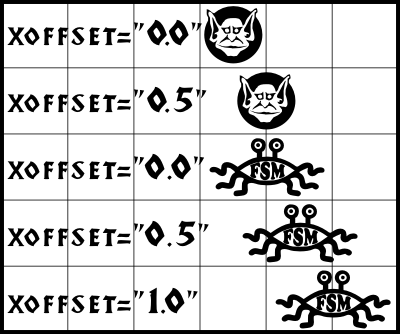
Transparent, wooden areas show the icon size: Goblin is a single square wide, the more powerful Flying Spaghetti Monster is a 2x1 squares wide.
If you would like to perfectly center your icons download these offset icons: there you will find icons ready to be pasted inside your HeroScribe folder and the .xml file including the necessary edits you will have to make inside your Objects.xml. Once installed, create a new quest map with only your icon and the relative sized offset icon on the behind, so that when you export the quest in .pdf and zoom in, you may see how much the offset will need to get tweaked. Save the map both in .pdf and .xml, close HeroScribe, make the relative offset changes inside Objects.xml, restart HeroScribe, load and resave both .pdf and .xml and look if your icon is centered - if it is not, keep changing its offset until needed.
Can I add new boards to HeroScribe?
Yes you can! On the Icon Packs Section you will find many new boards for your Quests!If you would like to personally work on your board without including it in an Icon Pack available here, you will need to follow an in-depth guide to create it yourself.
Can I add new rooms and passages to the board?
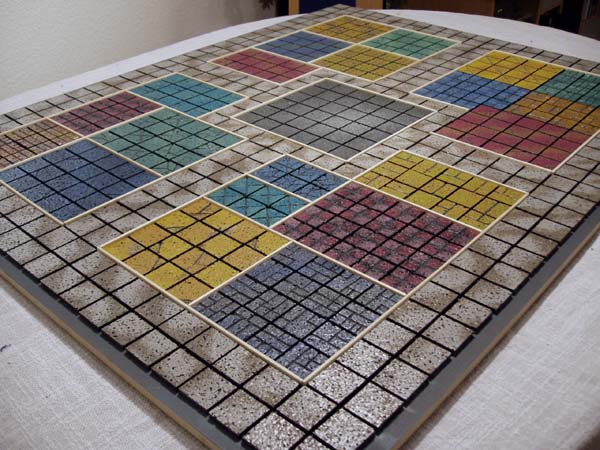
Yes, you can! Please download and install the SemiModular Icon Pack off the Icon Packs Section.Can I use the "german", double corridors version of the board? (sample)
Yes, you can! Please download and install the Mini furniture/German board Icon Pack from the Icon Packs Section. Actually, in HeroScribe you cannot. You may want to add it through your own graphics software, or could give a look at the HeroScribe Enhanced website. Please be aware that we cannot provide any help regarding HeroScribe Enhanced since it is not developed by us.Alternatively, you may want to try HQ Quest Maker, a new handy tool that allows to import HeroScribe-made maps and then create and edit Quest's notes; though it works only on low quality PNG images, it is becoming quite popular.
HeroScribe produces EPS/PDF files (highest quality) and PNG files (lowest quality that could be used as a quest preview).EPS files can be opened by most of the graphics editors, such as Ghostscript, Adobe Photoshop, Corel Draw and many another; if you do not owe any of them and are finding problems installing Ghostscript under Windows, here is a step-by-step guide:
1) Install the latest Ghostscript release;
2) Install the latest GSView release;
3) Open the EPS file through GSView and print it.
PDF files can be opened by Adobe Reader and many other programs, such as web browsers (if any PDF plugin is installed).
PNG files can be opened by any graphics editor; we advise XnView.
How do I edit high quality, .eps quests?
The Windows opensource way to edit your .eps quests is Inkscape, as usually. Inkscape doesn't currently support .eps editing, but there is a workaround: you will probably have already installed Ghostscript, as HeroScribe needs it to export .eps quests; we need to set its folders in the environment variables so that Inkscape can edit .eps files: do that by typing sysdm.cpl in the Start -> Run... panel, then go to System Properties -> Advanced -> Environment Variables -> Path and edit it by adding the bin and lib Ghostscript's folders:;C:\Program Files\gs\gs9.04\lib;C:\Program Files\gs\gs9.04\binThat's for those who have Ghostscript 9.04 installed on their Windows system, but you will need to tweak it if that's not your case. Now you will finally be able to open .eps files within Inkscape.
How can I manually edit XML files, and... should I?
XML files can be opened by any text editor, such as NotePad++ or TextEdit.There are various reasons why you may need to manually edit XML files: decimal position of objects (that is also possible directly in HeroScribe, if you download any of the latest Icon Packs, like the All-In-One), or batch conversion of several quests.
I downloaded some Icon Packs from HeroScribe.Org, how do I install them?
Every Icon Pack comes in a .zip file; you will need to extract it inside the HeroScribe setup folder (usually, C:\Program Files/HeroScribe) in order to enable it.I want to use two Icon Packs together, how do I do that?
Shall you need two or more Icon Packs installed simultaneously, you will need to include image files from every Icon Pack (Raster, Sample and Vector, both European - Europe - and American - USA - versions) and have them referenced under a category in the ultimate Objects.xml (open the Icon Pack's Objects.xml and copy the reference between the <object></object> tags of the wanted icon inside the ultimate Objects.xml - remember to include the <object> tags, too). XML files can be opened by any text editor, we suggest NotePad++, TextEdit.Practical instance: say you want to add Nazgul from Yon's Icon Pack (Yon's Objects.xml) and Beastman from Idomeneas' Icon Pack (Idomeneas' Objects.xml). You will need to copy the Nazgul reference from Yon's file, then paste it at the ultimate Objects.xml's end (please note references always go between the <objectList></objectList> tags); here's the reference:
<object name="Nazgul" id="Nazgul" width="1" height="1" kind="yon">Afterward, you will need to do the same with Beastman by Idomeneas. You might notice that while Nazgul's kind attribute is set to yon, the same attribute is set to idomeneas for Beastman; that is because they are listed in their own category inside HeroScribe. If you want them to be listed in the same category, just change the attribute's value to extra for both (extra or anything else, it is up to you), then add the extra category at the beginning of the ultimate Objects.xml. Since these are the categories from the original Objects.xml (id being the univocal entry, and name the entry displayed in HeroScribe):
<icon region="Europe" path="Europe/Yon/Yon.Nazgul_EU" original="false"/>
<icon region="USA" path="USA/Yon/Yon.Nazgul_US" original="false"/>
<note>
There is no Nazgul icon in any official HeroQuest release.
This icon was created by Yon. Revised by Derfel Link.
</note>
</object>
<kind id="hero" name="Heroes" />You will need to add the following line at the end of that list:
<kind id="monster" name="Monsters" />
<kind id="man-at-arms" name="Men-at-Arms" />
<kind id="furniture" name="Furniture" />
<kind id="door" name="Doors" />
<kind id="mark" name="Marks" />
<kind id="trap" name="Traps" />
<kind id="room" name="Rooms" />
<kind id="various" name="Various" />
<kind id="extra" name="Extra" />This is how the ultimate Objects.xml should look like. Again, you will also need to include all relative images (Raster, Sample and Vector, both European - Europe - and American - USA - versions) inside the Icons folder for this to work.
When using one or more Icon Packs together, please be aware that HeroScribe will not run if there are two or more icons by the same id.
I downloaded the All-In-One/Just Boards Icon Packs, but how do I switch board?
August '12 update: it is now possible to switch boards directly inside HeroScribe, just be sure to install the All-In-One Icon Pack 1.0.38 or above.As for the older HeroScribe/Icon Packs' versions, when you want to switch boards choose the one you would like to use in HeroScribe and copy the <board> code from the relative .xml file, then replace that code in the original Objects.xml from the HeroScribe folder.
Say you want to use the Dragon Strike City board, just copy the <board> code from /HeroScribe/Boards/Dragon Strike City.xml:
<board width="20" height="17" borderDoorsOffset="0.08" adjacentBoardsOffset="-0.5">And replace it in the <board> code section inside /HeroScribe/Objects.xml, so that the following code:
<icon region="Europe" path="Europe/CityBoard_EU" />
<icon region="USA" path="USA/CityBoard_US" />
</board>
<board width="26" height="19" borderDoorsOffset="0.08" adjacentBoardsOffset="-0.5">Is replaced by:
<icon region="Europe" path="Europe/Board_EU" />
<icon region="USA" path="USA/Board_US" />
<!-- Border corridors -->
<corridor left="1" top="1" width="26" height="1" />
<corridor left="1" top="19" width="26" height="1" />
<corridor left="1" top="1" width="1" height="19" />
<corridor left="26" top="1" width="1" height="19" />
<!-- 2x7 corridors -->
<corridor left="13" top="1" width="2" height="7" />
<corridor left="13" top="13" width="2" height="7" />
<!-- 10x1 corridors -->
<corridor left="1" top="10" width="10" height="1" />
<corridor left="17" top="10" width="10" height="1" />
<!-- 1x7 corridors -->
<corridor left="10" top="7" width="1" height="7" />
<corridor left="17" top="7" width="1" height="7" />
<!-- 8x1 corridors -->
<corridor left="10" top="7" width="8" height="1" />
<corridor left="10" top="13" width="8" height="1" />
</board>
<board width="20" height="17" borderDoorsOffset="0.08" adjacentBoardsOffset="-0.5">Objects sample.xml is how the original /HeroScribe/Objects.xml should look like if you want to use the Dragon Strike City board inside HeroScribe.
<icon region="Europe" path="Europe/CityBoard_EU" />
<icon region="USA" path="USA/CityBoard_US" />
</board>
To switch back to the original HeroQuest gameboard, just copy the <board> code from /HeroScribe/Boards/HeroQuest.xml inside the <board> code section of /HeroScribe/Objects.xml. Please note that in /HeroScribe/Boards are shown previews for all the boards available in HeroScribe (the board square size is shown in filename).
I want to easily choose between two boards, how do I do that?
August '12 update: it is now possible to switch boards directly inside HeroScribe, just be sure to install the All-In-One Icon Pack 1.0.38 or above.As for the older HeroScribe/Icon Packs' versions, drathe from Ye Olde Inn recommends creating two additional folders within the HeroScribe folder. Name one 1st Board (or whatever you like) and the other 2nd Board. Inside each, store a copy of Objects.xml, Icons/Raster/Europe/Board_EU.png, Icons/Raster/USA/Board_US.png, Icons/Vector/Europe/Board_EU.eps.gz and Icons/Vector/USA/Board_US.eps.gz files; one set for your first board and the other for the other one. Then all you have to do is copy and paste the contents into the main HeroScribe folder before loading the program when you want to switch.
My question is not answered here!
Drop us a line including the following info:- OS you are running;
- HeroScribe version you are using;
- Icon Pack you may be using;
- Your issue;
- Your step-by-step actions.